
Three Formulas, Not a Job Title
lightbulb The big idea
LinkedIn calls the headline "your own personal ad," not a repeat of your title, and recommends naming a specific achievement, distinguishing title, or specialization instead3. Three formulas cover almost every job-seeker case.
Practitioner. You want the job you already do, just at a new company. Lead with your target title, a couple of signature skills, and a metric4.
Bridge. You're moving from one field into another. Pair your prior role with your target role and the one skill that connects them5.
Specialist. You're known for one narrow thing. Lead with the niche title and the method or credential that backs it up6.
Your headline sits inside the introduction card every visitor sees first7, it resurfaces in search results, comments, and network recommendation sections every time your name does2, and it shows up in the "who's viewed your profile" list of anyone whose page you visit, depending on your visibility settings8.
You get 220 characters to spend on it3. Spend them on one of the three formulas above, not on your job title alone.
One Rewrite, Start to Finish
You've seen the formulas. Here's how one plays out in a real search. Maria Chen is a data analyst at a regional health system. Her headline read "Data Analyst at Meridian Health": thirty-two characters, all of them a repeat of information already sitting in her Experience section a few lines down. She wanted a step up, into analytics manager roles at larger health systems.
She picked the Practitioner formula, because she wasn't changing lanes. She was leveling up in the same one. Her target role: Senior Data Analyst. Her signature skills: the tools recruiters actually search for. SQL, Python, and Tableau. Her metric: the reporting-cycle improvement from her last performance review.
The result: "Senior Data Analyst · SQL, Python, Tableau · Cut monthly reporting cycle from 9 days to 3." Ninety-one characters, well under the 220-character limit3, and it names her target title, two searchable skills, and a number a hiring manager can picture without a follow-up question.
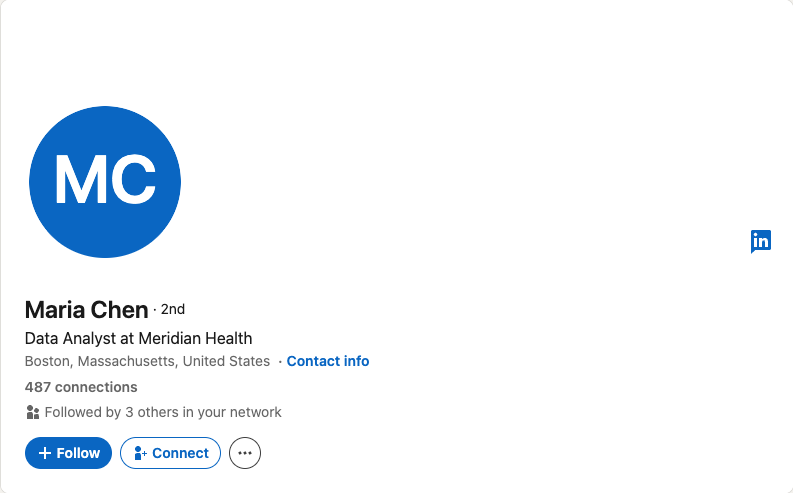
Repeats her job title. Adds nothing Recruiter didn't already have from Experience.
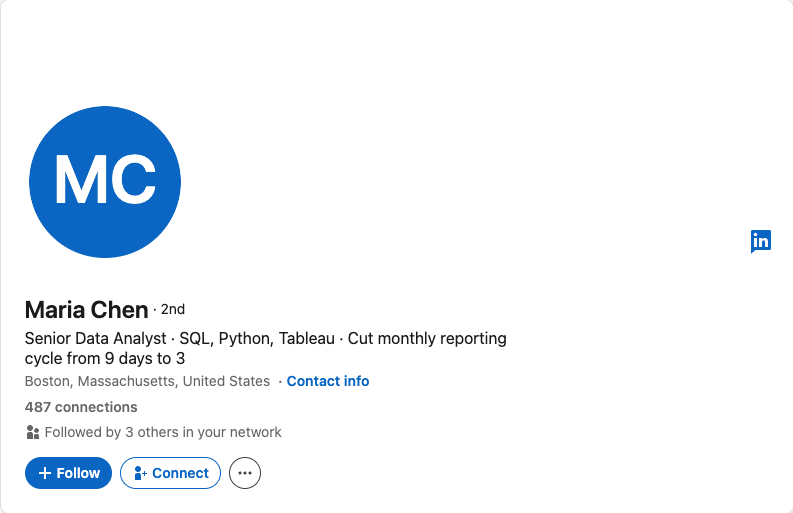
Target title, two searchable skills, one number.
If you're a Bridge or a Specialist instead of a Practitioner, the pattern holds.
A Bridge headline for someone leaving teaching for product roles: "8th-Grade Science Teacher → Product Operations Manager · Cross-Functional Coordination · Led curriculum rollout across 40 classrooms." A Specialist headline for someone who does one thing and does it deep: "B2B SaaS Pricing Strategist · Usage-Based Pricing Models · I help Series A startups fix pricing before their next round."
None of these three headlines calls anyone a "self-starter" or a "team player," the exact clichés LinkedIn's 2025 headline guidance says to cut for something more memorable3. Each one instead answers the only question a recruiter skimming a results page is actually asking: does this person do the job I'm hiring for?
The same fix holds across roles:
| Role | Weak headline | Rewrite |
|---|---|---|
| Software Engineer | Software Engineer at Initech | Backend Engineer (Java, Kafka) · Reduced checkout latency 40% at Initech |
| Product Manager | Product Manager | Senior PM, B2B Fintech · Roadmap & Pricing · Grew paid conversion 18% in two quarters |
| Marketer | "Coffee-fueled marketer who loves solving puzzles" | Lifecycle Marketing Manager · Email & Retention · Grew subscriber revenue 22% YoY |
| Data Analyst | Data Analyst at Meridian Health | Senior Data Analyst · SQL, Python, Tableau · Cut monthly reporting cycle from 9 days to 3 |
| Career Switcher | 8th-Grade Science Teacher | 8th-Grade Science Teacher → Product Operations Manager · Cross-Functional Coordination · Led curriculum rollout across 40 classrooms |
Five Steps to Rewrite Yours
1. Pick your archetype. If you can describe your target role in the same sentence as your current one, you're a Practitioner. If your explanation needs the word "into," as in "moving into product," you're a Bridge. If people in your network already come to you for one specific thing, you're a Specialist.
2. Apply the formula. Fill in the blanks for your archetype from the template block below. Use your actual target title, not a softened version of it, and use a metric you could defend if someone asked about it in an interview.
3. Strip everything else. This next part is the playbook's own editorial call, not a LinkedIn rule: cut emoji, cut vertical bars stacked three deep, cut lines like "Growth-obsessed changemaker." LinkedIn's own 2025 headline guidance includes a positive example that ends in a smiley face3, so nothing here is a platform requirement.
The reason to cut clutter anyway is legibility. A headline a recruiter skims in two seconds should read as one idea, not three stapled together.
One reviewer for this playbook tested the anti-pattern head-on. For two months their headline read "Coffee-fueled marketer who loves solving puzzles." Memorable, sure. It named no role, no skill, and no keyword that LinkedIn Recruiter's Job titles or Keywords filters could match to anything910.
Zero InMails in two months. They replaced it with "Lifecycle Marketing Manager · Email & Retention · Grew subscriber revenue 22% YoY": no cleverness, just a title, a skill set, and a number. InMails resumed within the week.
Sixty days of nothing.
Recruiter's search index had nothing to match on — no title, no skill, no keyword — so the pipeline had nothing to send. The metaphor picks itself.

4. Test it against the recruiter search view. Recruiter's free-text Keywords filter highlights matches on the profile card, the Summary section, Experience, and Skills9.
Its separate Job titles filter searches the position titles in your Experience section, not your headline10. Put your target keywords in the headline anyway. The profile card is the first thing a recruiter sees in a results list, and your headline is what renders on it.
5. Rewrite it once at two other seniority levels. Take your finished headline and write it again as if you were one level junior and one level senior. If all three versions look identical except the word "Senior," your headline describes the job family, not you. Add back whatever is actually true only at your level: the budget you own, the team you lead, or the certification you hold.
The Formulas, Ready to Fill In
Copy the row that matches your situation, then fill in your own title, skill, and proof point. Keep the total under 220 characters3.
| Archetype | Formula | Example A | Example B |
|---|---|---|---|
| Practitioner | [Target role] · [Signature skill] · [Metric or outcome] | Senior Data Analyst · SQL, Python, Tableau · Cut monthly reporting cycle from 9 days to 3 | Backend Engineer (Java, Kafka) · Reduced checkout latency 40% at Initech |
| Bridge | [Prior role] → [Target role] · [Bridging skill] · [Proof] | 8th-Grade Science Teacher → Product Operations Manager · Cross-Functional Coordination · Led curriculum rollout across 40 classrooms | Registered Nurse → Healthcare Product Manager · Clinical Workflow Design · Shipped an EHR feature used by 200 nurses |
| Specialist | [Niche title] · [Signature method] · I help [audience] [outcome] | B2B SaaS Pricing Strategist · Usage-Based Pricing Models · I help Series A startups fix pricing before their next round | Perioperative Nurse Educator · Simulation-Based Training · I help hospital ORs cut new-hire ramp time in half |
Six Checks Before You Publish
-
Names your target job titlesomewhere prominent. Recruiters can filter candidates by job title directly10, so your Experience section carries that weight if your headline doesn't.
-
Includes a keyword a recruiter might actually type.Recruiter's Keywords filter highlights matches on your profile card, Summary section, Experience, and Skills9.
-
Fits inside 220 characters3.
-
Contains a number, method, or credential.Not an adjective.
-
Doesn't repeat "Open to Work" in the textnow that you've turned on the feature built for exactly that signal11.
-
Reads as one idea in two seconds, not three ideas glued together with vertical bars.
Your headline earns the click. The About section right below it is what keeps a recruiter reading past the first two lines, or loses them at "Passionate about..." before they scroll. That's Chapter 2.
Notes
-
LinkedIn Help Center, "Edit Your Headline," accessed 2026-08-14. Confirms the headline is a field distinct from your job title, displayed in search results. https://www.linkedin.com/help/linkedin/answer/a542926/edit-your-headline?lang=en ↑
-
LinkedIn Help Center, "Differences between profile appearances and profile views on LinkedIn," accessed 2026-08-14. Confirms name-plus-headline surfaces in search results, others' feeds, comments, and network recommendation sections. https://www.linkedin.com/help/linkedin/answer/a7105642 ↑
-
LinkedIn Talent Solutions Blog, Sid Lipsey and Jen Dewar, "10 LinkedIn Profile Headlines to Inspire Your Own," Feb 27, 2025. Source for the 220-character limit, the "personal ad" framing, the buzzword guidance, and the emoji example. https://www.linkedin.com/business/talent/blog/product-tips/recruiters-with-eye-catching-linkedin-profile-headlines ↑↑↑↑↑↑↑
-
Jobscan, Kelsey Purcell CPRW, "LinkedIn Headline Examples: 50+ Templates & Formulas (2026)," Nov 18, 2025. Source for the Practitioner-style formula pattern. https://www.jobscan.co/blog/impactful-linkedin-headline-examples/ ↑↑↑
-
Same Jobscan article as 4. Source for the Bridge-style formula pattern. ↑
-
Same Jobscan article as 4. Source for the Specialist-style formula pattern. ↑
-
LinkedIn Help Center, "Information Displayed on the Introduction Section on Your Profile," accessed 2026-08-14. Confirms the headline is part of the above-the-fold introduction card. https://www.linkedin.com/help/linkedin/answer/38579/information-displayed-on-the-introduction-card-on-your-profile-overview?lang=en ↑
-
LinkedIn Help Center, "Who's viewed your profile visibility settings," accessed 2026-08-14. Confirms your name and headline can surface in another member's "who's viewed your profile" list, depending on visibility settings. https://www.linkedin.com/help/linkedin/answer/a568195 ↑
-
LinkedIn Recruiter Help, "Use Boolean to filter search results in Recruiter and Recruiter Lite," accessed 2026-08-14. Confirms the Keywords filter highlights matches on the profile card, Summary section, Experience, and Skills. https://www.linkedin.com/help/recruiter/answer/a415295 ↑↑↑
-
LinkedIn Recruiter Help, "Filter search results in Recruiter and Recruiter Lite," accessed 2026-08-14. Confirms the Boolean-searchable Job titles filter is tied to Experience-section titles, not the headline field. https://www.linkedin.com/help/recruiter/answer/a414281 ↑↑↑
-
LinkedIn Help Center, "Let recruiters know you're Open to Work," accessed 2026-08-14. Confirms the dedicated Open to Work feature is separate from the headline field. https://www.linkedin.com/help/linkedin/answer/a507508/let-recruiters-know-you-re-open-to-work?lang=en ↑